> For the complete documentation index, see [llms.txt](https://help.getcustomeriq.com/llms.txt). Markdown versions of documentation pages are available by appending `.md` to page URLs; this page is available as [Markdown](https://help.getcustomeriq.com/product-guides/meeting-recording/zoom-admin-settings-to-avoid-common-zoom-recording-errors.md).
# Zoom Admin Settings to Avoid Common Zoom Recording Errors
Common situations in Zoom that prevent a bot from recording.
## Host was not present
Sometimes a bot joins a meeting but is unable to record because it never asked for permission. In this case, this means the host was not present and thus was unable to grant recording permissions to the bot.
You'll be able to identify this scenario because the bot will be in the meeting as a participant but not have the recording symbol next to its name.
In order for a bot to get recording permissions when the host is not present in the meeting, the creator of the meeting must be authenticated via the [Zoom OAuth Integration](/product-guides/meeting-recording/zoom-oauth-integration.md).
> ### 📘But I am the host and am present, why are we still not getting the confirmation message?
>
> If the end user that created the meeting is not showing up as the host, one of two things is going on:
>
> * You are not signed into the Zoom account where the meeting was created from
> * You are not signed into your Zoom client at all
## The host's local recording setting is disabled
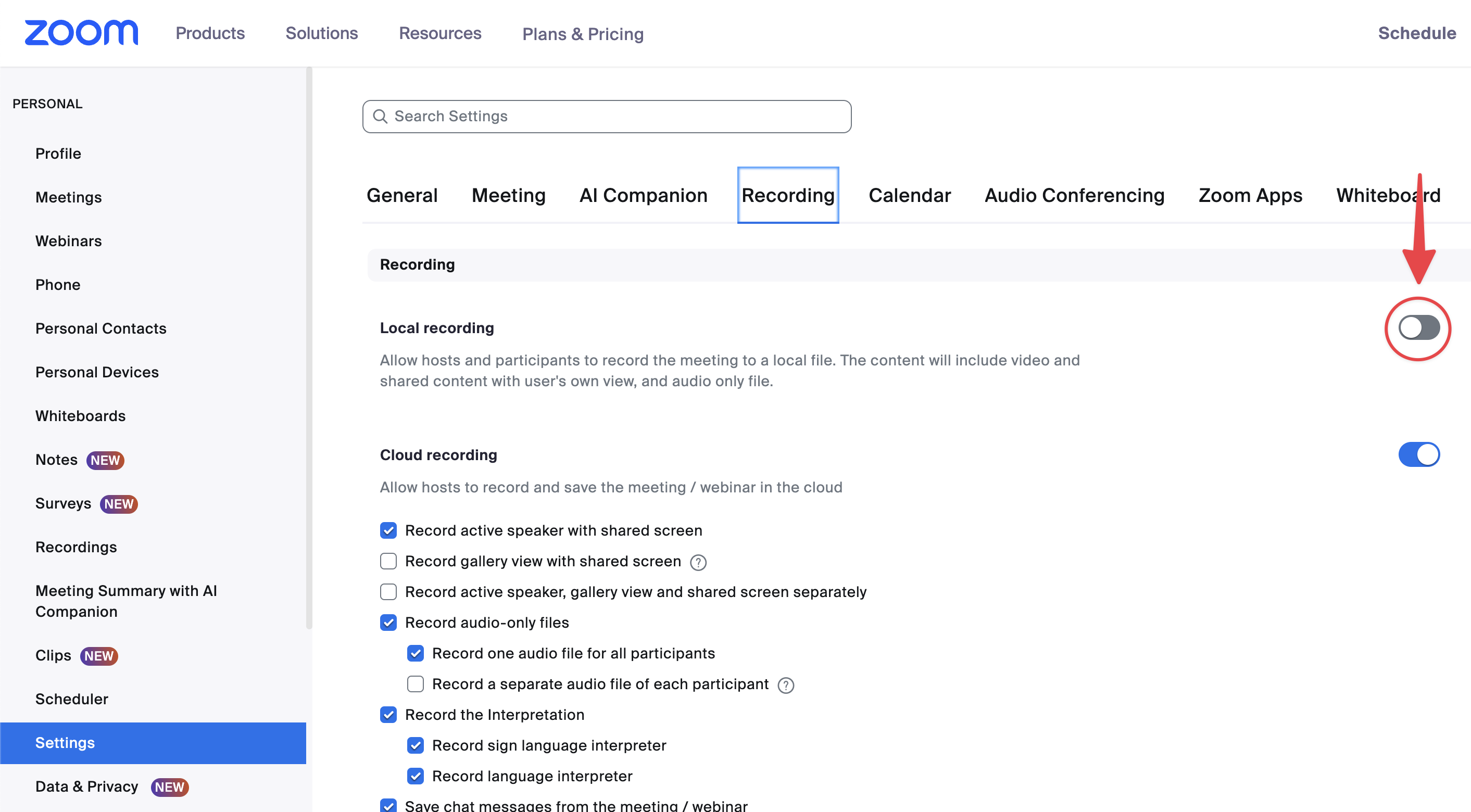
If the host's global local recording setting is disabled, the bot will fail to record.
In this case, the bot will have a Recording Permission Denied event with a `zoom_local_recording_disabled.`
**How to fix:** Host should enable their global user-level local recording setting in their Zoom user settings:
## The host has disabled permitting participants to record locally
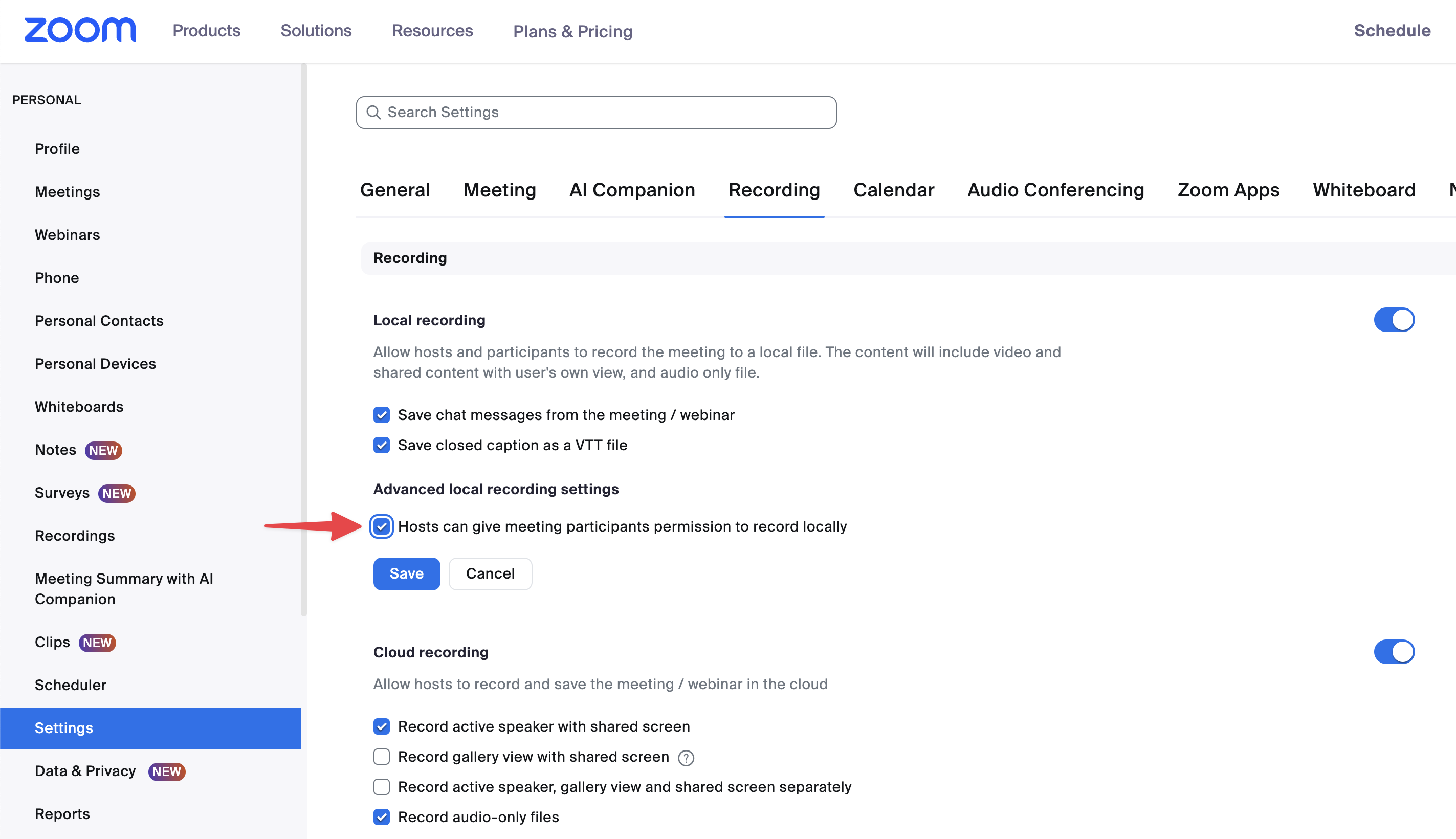
In this case, the host has their **global** local recording setting enabled, but they can't grant participants permission to record locally, which is needed for a bot to record.
**How to fix:** Host should enable this setting by checking the box labelled:
*Advanced local recording settings > Hosts can give meeting participants permission to record locally* \*\*
## The host's ADMIN has disabled permitting participants to record locally
Similar to the above case, there is a setting across the entire Zoom workspace account that can prevent Zoom users in your workspace from permitting participants to record locally.
**How to fix:** Your Zoom admin should enable this setting by checking the box labelled:
*Account management > Account Settings > Recording & Transcript > Hosts can give meeting participants permission to record to their computer \*\**
{% hint style="info" %}
**Note**: Make sure you DO NOT also check the box labelled "Only users in your account can request to record to their computer" as this will prevent the bot from being able to request to record.
{% endhint %}
## The host has disabled requesting recording permission within the current call
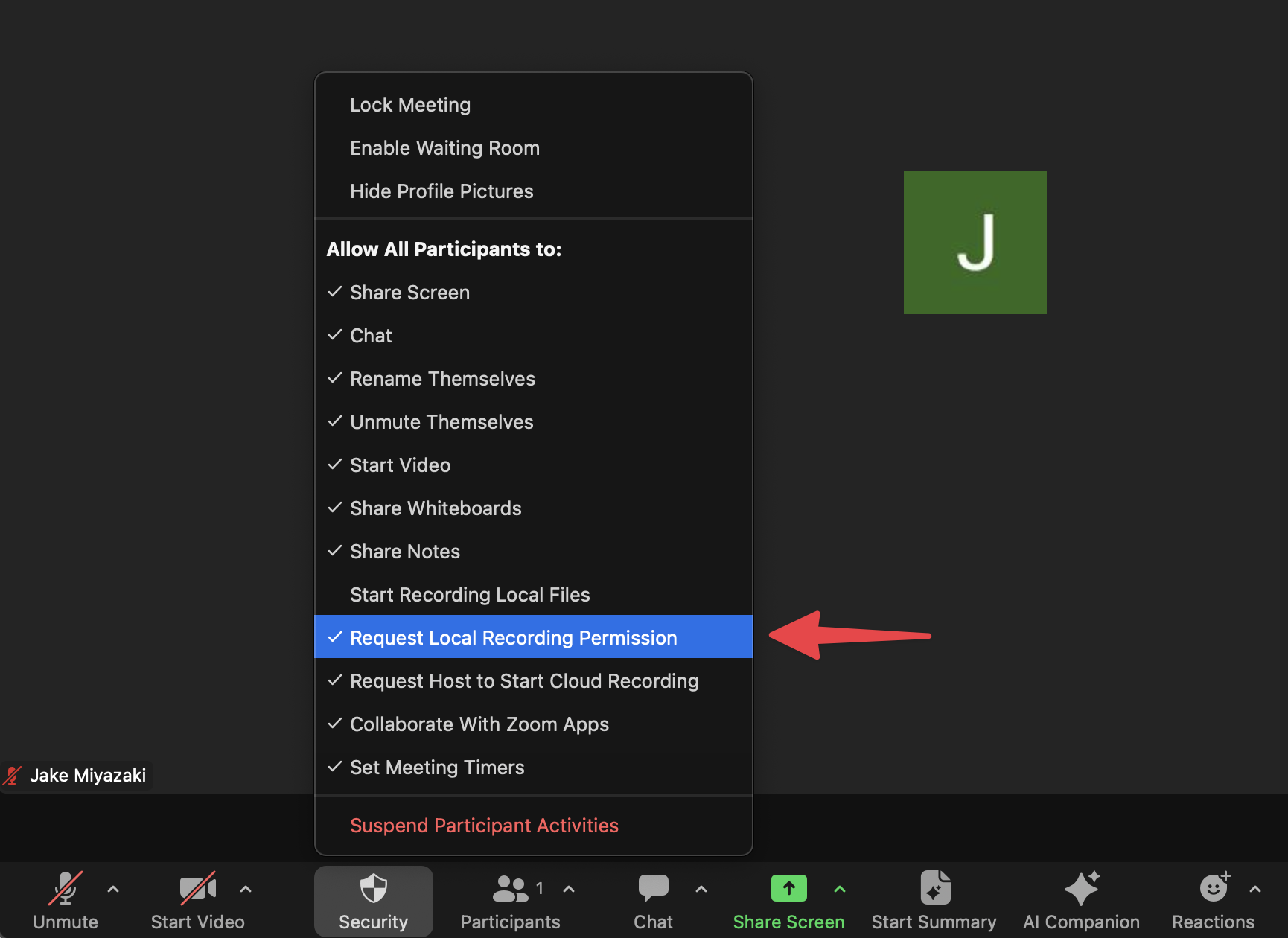
If the host has the proper user-level recording settings set up properly on the Zoom website, but has disabled the option to allow participants to request local recording *within the call*, the bot will not be able to record.
**How to fix:** Host should enable this setting within the call:
## Zoom internal error
On rare occasions, your bot may fail to enter a call with a `zoom_internal_error`sub code.
Unfortunately this means something went wrong on Zoom's end, and we have limited visibility into the underlying error. We do our best to handle these errors internally through retries but on rare occasions this error can cause a bot to fail.
If you're seeing this error recur for a certain situation or user, please let us know and we can raise the issue with Zoom.
## Host never received the recording consent popup
In certain cases, a user may report that the bot never recorded and they never received a recording consent popup to grant recording permissions.
This is the same situation as the host not being present, but in this case, the end user that created the meeting was actually in the call.
If the host claimed they were present, but no participant is shown as the host, it's likely that the user joined the Zoom call while signed into a different Zoom user than the one that the meeting was created from.
Many users have multiple Zoom accounts and they'll need to ensure they're joining the meetings from the same account as the one they're creating meetings from. If the end user needs to support granting recording permissions from various Zoom accounts, they can assign their alternative account(s) as alternative hosts.