# Voice notes

From CustomerIQ's home page you can record audio to capture meeting notes on the fly, or even record entire in-person meetings. This is great for recording notes or entire in-person meetings.

**If you do not host in-person meetings or wish to record audio notes you can skip this step.**

### &#x20;**(iPhone Users) Save CustomerIQ to your mobile device' home screen**

1. Login to [app.getcustomeriq.com](https://app.getcustomeriq.com/auth/login) from your mobile device

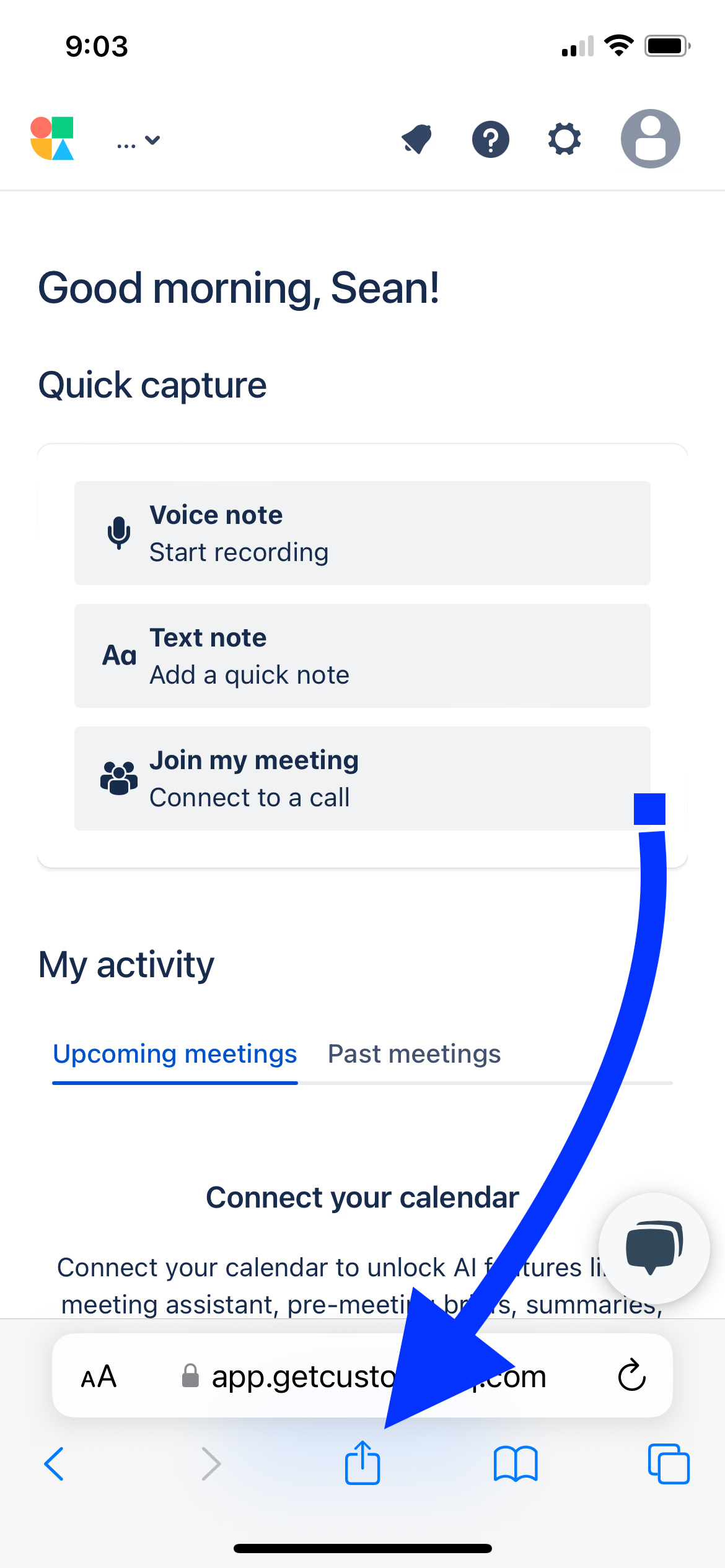
2. From CustomerIQ's home page, click the share page icon:
   1. On Chrome

      <div align="left"><figure><img src="https://3003311078-files.gitbook.io/~/files/v0/b/gitbook-x-prod.appspot.com/o/spaces%2F2WNNVBPNjHyWSPniJdxl%2Fuploads%2F9Y5us6za0UMSFWV8trcL%2FChrome%20Save%20Button%20iPhone.PNG?alt=media&#x26;token=d1affcc1-acf0-4762-a5da-cd4edf133a86" alt="" width="188"><figcaption><p>Share page from Chrome</p></figcaption></figure></div>

   2. On Safari&#x20;

      <div align="left"><figure><img src="https://3003311078-files.gitbook.io/~/files/v0/b/gitbook-x-prod.appspot.com/o/spaces%2F2WNNVBPNjHyWSPniJdxl%2Fuploads%2FYi3lUt8YuvnF3G6faCKo%2FSafar%20Save%20Button.PNG?alt=media&#x26;token=4d717dd3-c6bd-4f87-a2c7-594049c1477e" alt="" width="188"><figcaption></figcaption></figure></div>

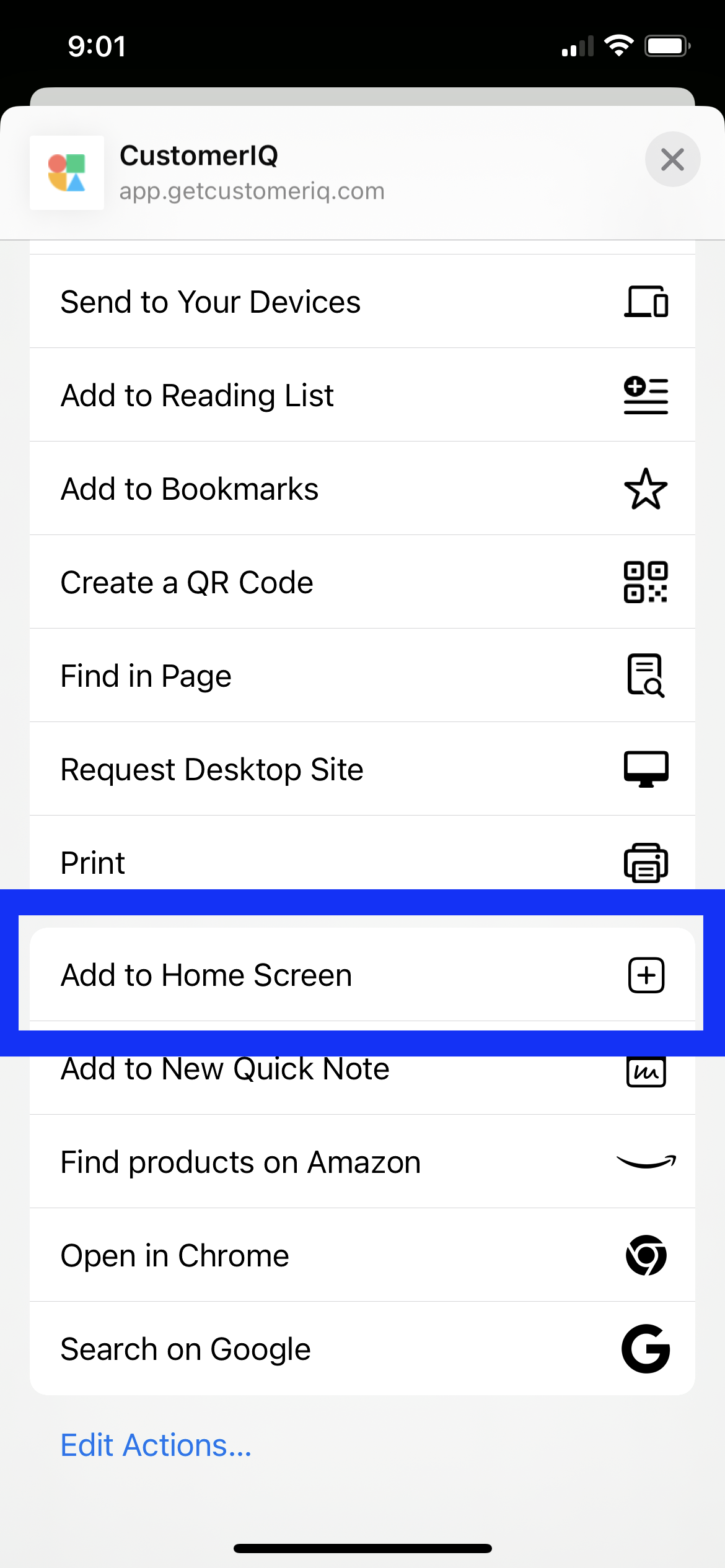
3. Click "Add to Home Screen"

   <div align="left"><figure><img src="https://3003311078-files.gitbook.io/~/files/v0/b/gitbook-x-prod.appspot.com/o/spaces%2F2WNNVBPNjHyWSPniJdxl%2Fuploads%2FtRQHxc1a2Wvtb8pHvq5P%2FAdd%20to%20home%20screen%20iPhone.PNG?alt=media&#x26;token=56296ba1-cc1f-44e5-ad50-4f73e631dd92" alt="" width="188"><figcaption></figcaption></figure></div>

Now you can easily access CustomerIQ from your home screen.

### &#x20;**(Android Users) Save CustomerIQ to your mobile device' home screen**

1. Login to [app.getcustomeriq.com](https://app.getcustomeriq.com/auth/login) from your mobile device

2. From CustomerIQ's home page, click the three vertical dots in the top right corner:

   1. Select add to home screen

      <div align="left"><figure><img src="https://3003311078-files.gitbook.io/~/files/v0/b/gitbook-x-prod.appspot.com/o/spaces%2F2WNNVBPNjHyWSPniJdxl%2Fuploads%2FfaZciGxFojuuGD1BeRJK%2FAdd%20to%20home%20screen%20Android.jpg?alt=media&#x26;token=42cf4fe6-5777-430a-91ad-32c27c491bb1" alt="" width="188"><figcaption></figcaption></figure></div>

3. Choose Install or Create shortcut (either works)

   <div align="left"><figure><img src="https://3003311078-files.gitbook.io/~/files/v0/b/gitbook-x-prod.appspot.com/o/spaces%2F2WNNVBPNjHyWSPniJdxl%2Fuploads%2FpMeom6bAkmLSWJ8Mddtq%2Finstall%20or%20create%20shortcut%20android.jpg?alt=media&#x26;token=c348fcb3-daef-471c-8e5f-56f15ef098d5" alt="" width="188"><figcaption></figcaption></figure></div>

Then confirm. Now you can easily access CustomerIQ from your home screen.

### Add a voice note

Now you can quickly add a voice note, or record an in-person meeting, by recording the audio and adding it as a submission

1. Choose "Add a voice note" from the application's home screen
   1\.

   ```
   <div align="left"><figure><img src="https://3003311078-files.gitbook.io/~/files/v0/b/gitbook-x-prod.appspot.com/o/spaces%2F2WNNVBPNjHyWSPniJdxl%2Fuploads%2FaymO0hT5bqt5QKo2Xhgp%2FIMG_6064.PNG?alt=media&#x26;token=36b72dba-42ee-479c-ad2d-13e79d435cf8" alt="" width="188"><figcaption><p>Home page mobile view</p></figcaption></figure></div>
   ```

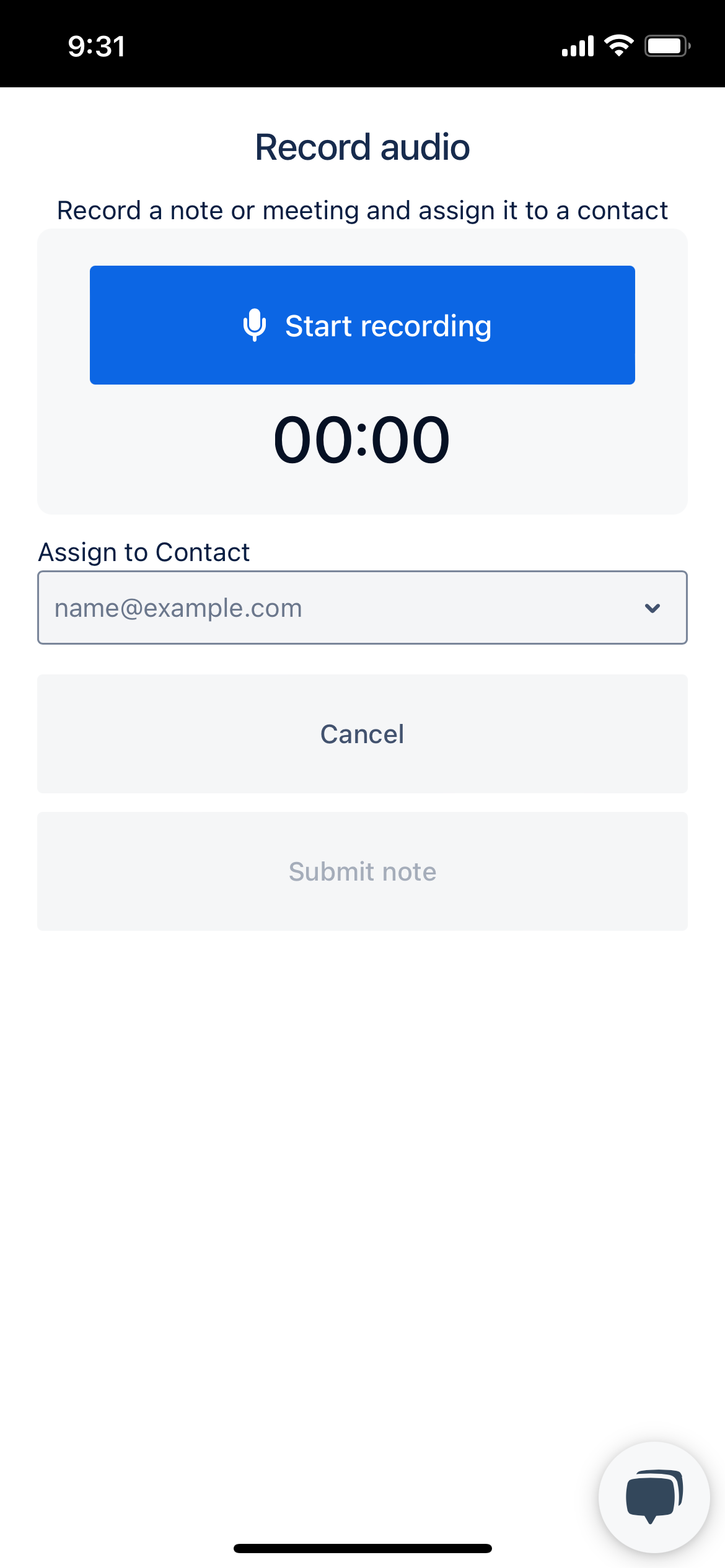
2. Press start recording and record a voice note (entire meeting). When you're finished, stop recording.

   <div align="left"><figure><img src="https://3003311078-files.gitbook.io/~/files/v0/b/gitbook-x-prod.appspot.com/o/spaces%2F2WNNVBPNjHyWSPniJdxl%2Fuploads%2Fw9NOeK7N9y6PlR3XAPyz%2FIMG_6065.PNG?alt=media&#x26;token=fe285028-7040-48e7-91e1-452611726c9d" alt="" width="188"><figcaption></figcaption></figure></div>

3. Assign a contact to associate with the recording and submit!

   <div align="left"><figure><img src="https://3003311078-files.gitbook.io/~/files/v0/b/gitbook-x-prod.appspot.com/o/spaces%2F2WNNVBPNjHyWSPniJdxl%2Fuploads%2FCBbaVESSKfwHV4MWlYX9%2FIMG_6066.PNG?alt=media&#x26;token=1d031717-f411-4975-8ea4-bfcf1207df6e" alt="" width="188"><figcaption></figcaption></figure></div>

Now, CustomerIQ will transcribe the audio and analyze it for any relevant CRM properties.